When a flight is delayed or cancelled, a reliable internet connection helps you check airline updates, find rebooking options and notify your hotel or airport transfer about changes to your arrival time. Airport Wi-Fi may be slow or unavailable when you need it, so having mobile data ready before your trip gives you another way to get online. This guide explains why reliable Internet matters during travel delays, what to do when a delay occurs, how mobile data compares with airport and in-flight Wi-Fi, and how a flight disruption can affect your travel eSIM’s validity.
In this article
Why does reliable internet matter when your flight is delayed?
Reliable internet helps you access flight updates, manage rebooking options and contact service providers before a disruption affects the rest of your trip.
When a flight is delayed or cancelled, airlines may provide updated departure times, alternative flights and eligible vouchers through their apps, websites, email or text messages. A working connection helps you access these options and respond promptly.
Some airline apps handle part of the rebooking for you. For example, United announced in 2023 that its app displays rebooking options on the home screen when a flight is delayed by more than 60 minutes or cancelled. Eligible passengers may also receive hotel, meal or rideshare vouchers through the app.
However, getting online does not guarantee a new seat, a voucher or compensation. These options depend on the airline’s policies, the circumstances of the disruption and applicable passenger rights.
What should you set up before you fly?
Because you need Wi-Fi to set up the eSIM, so you should set up your internet connection, airline app and offline travel documents before departure so you can act without depending entirely on airport Wi-Fi.
Use this checklist to prepare:
Install and check your eSIM. Confirm it covers every country on your route. Learn how to enable data roaming if required. If you keep your home SIM active with a dual SIM setup, check its roaming settings to avoid unexpected charges. See our eSIM installation guide.
Install your airline’s app. Log in, add your booking and enable notifications. Check that the email address and phone number on your reservation are correct.
Save essential travel information offline. Keep your booking reference, boarding pass, airline contact number, hotel address and transfer details in your phone’s wallet, a note or screenshots.
Download offline maps. Google Maps supports offline maps in eligible areas, but offline navigation has limitations. For example, driving routes may be available when public transit, walking or cycling directions are not.
Check hotspot support if you work on a laptop. Confirm that your eSIM allows tethering before relying on it for work. Some Gigago plans for Japan, Thailand and Europe support hotspot, but availability depends on the specific plan. See our guide to setting up an eSIM hotspot.
Bring a charged power bank for a long wait.
What should you do first when your flight is delayed?
Check your airline’s app or website for the latest flight status and rebooking options, then update any bookings affected by your new arrival time.
Follow these steps:
Check the airline app or website for a new departure time or rebooking offer.
Switch connections if a page keeps timing out instead of reloading it on the same Wi-Fi.
Update your onward plans. Message your hotel, transfer or tour operator with your new arrival time.
Save screenshots of delay notices, new itineraries and offers in case you claim expenses later.
If you cannot resolve the disruption online, contact the airline by phone or seek assistance at the airport. You can check digital options while waiting in a customer service queue, but do not assume every rebooking can be completed in the app.
Can reliable internet help you claim a refund after a flight disruption?
Yes. A reliable internet connection helps you check your airline’s refund policy, review your options and submit a request after a flight disruption. Whether you qualify for a refund or compensation depends on the applicable rules and circumstances of your flight.
Airport Wi-Fi or mobile data: which is more reliable during a delay?
Mobile data through your own eSIM is a useful alternative when airport Wi-Fi is unreliable, while airport Wi-Fi can be convenient for routine browsing and downloading information. Neither option guarantees an uninterrupted connection.
Mobile data: Uses a local cellular network rather than the airport’s Wi-Fi. Its performance still depends on coverage, network congestion and your eSIM plan.
Airport Wi-Fi: Lets you get online without using your mobile data allowance, but speeds and availability can vary with network congestion and local conditions.
For time-sensitive tasks such as checking rebooking options or contacting a hotel, having both options available gives you an alternative if one connection fails. Save essential travel information offline before departure so you can still access it without an internet connection.
Speed, latency and stability: what actually matters?
Connection stability is essential during a flight disruption because repeated disconnections can interrupt bookings, messages and other time-sensitive tasks. Speed and latency also affect how quickly websites and apps respond.
Speed is how fast data downloads and uploads.
Latency is how quickly the connection responds.
Stability is how consistently your connection works over time.
A high speed-test result does not guarantee a reliable connection throughout a delay. Weak coverage, network congestion and temporary outages can still interrupt your activity.
Read our guide to latency and ping to understand how these factors affect your connection.
Is it safe to use airport Wi-Fi?
Airport Wi-Fi is generally suitable for everyday browsing, but you should still take precautions when accessing bookings or entering personal information. Public networks may expose you to risks such as fake Wi-Fi hotspots, fraudulent websites and phishing attempts.
The US Federal Trade Commission notes that public Wi-Fi is often safer than it once was because encryption is widely used. However, encryption does not protect you from every online threat.
To reduce your risk, take these steps:
Connect to the airport’s official Wi-Fi network. Confirm its name with airport staff if necessary.
Use your airline’s official app or enter its website address directly into your browser.
Check that websites use HTTPS before entering personal information.
Do not ignore security warnings or follow unexpected links in messages.
Switch to your own mobile data if you are unsure whether a network is legitimate.
For managing a disrupted booking, your airline’s official app is often convenient because it brings itinerary information and available disruption-management features together.
Why doesn’t my iPhone switch to mobile data when Wi-Fi is weak abroad?
Your iPhone may not automatically switch to cellular data when airport Wi-Fi becomes unreliable abroad because Apple’s Connectivity Assist does not operate while the device is roaming internationally.
Wi-Fi Assist can use cellular data when a Wi-Fi connection is poor under supported conditions. However, it is not a reliable fallback when you are roaming internationally.
If airport Wi-Fi becomes unreliable, check your cellular data settings and switch to your travel eSIM manually if necessary. Make sure your eSIM has coverage and an active data allowance before relying on it.
Will you have internet access if your flight is delayed onboard?
Not necessarily. In-flight Wi-Fi availability depends on the airline, aircraft and onboard connectivity service, so you should not rely on it during a delay.
Before boarding, download essential travel documents and send any urgent messages while you still have a reliable connection. If you want to know how onboard connectivity works, see our guide to airplane Wi-Fi.
How can a travel delay affect your eSIM plan?
A flight delay can use up part of your eSIM validity if the plan starts counting days before you arrive. The impact depends on the activation rules of your specific plan.
There are 2 common arrangements:
Validity starts at installation or activation. If your plan starts when you install the eSIM or scan its QR code, a delay after that point may use up part of your validity before you arrive.
Validity starts at first network connection. If the plan starts when the eSIM first connects to a supported network, validity begins when that connection occurs. This may happen at a transit airport in a covered country rather than at your final destination.
Do not assume every eSIM follows the same rule. Check the activation policy on the product page before purchasing or installing your plan.
What happens to Gigago eSIM validity if your flight is delayed?
The effect depends on the activation rules and daily validity policy of your chosen Gigago plan.
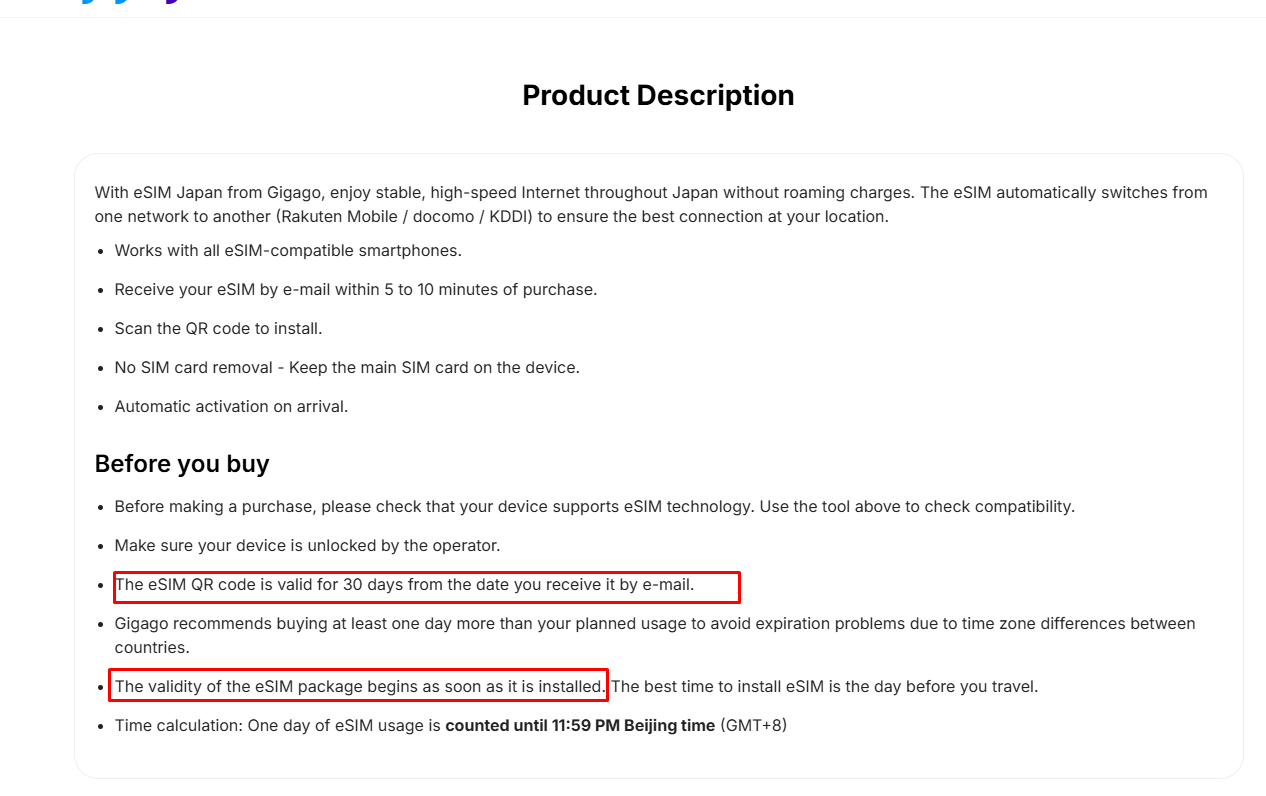
Many Gigago plans, including Japan, Europe and Thailand, start when you scan the QR code. They connect automatically when you arrive, but the clock is already running. Some Vietnam plans instead start on first connection in Vietnam.
The rules of validity starting time described on Gigago’s Japan eSIM product page
If you hear about a delay before installing, you can wait, because the QR code stays valid for 30 days after you receive it. Once a plan is bought, its start date cannot be changed, so check how it starts before you buy.
Some plans, such as Japan and China, also end each day at 11:59 PM Beijing time (GMT+8), so a first day that begins late can be very short. Gigago’s Japan and Europe pages recommend buying at least one extra day, which also gives you a buffer if your flight is late. For more detail, see whether a travel eSIM expires if you don’t use it and using an eSIM on long-haul flights and layovers.
What if my eSIM is installed but won’t connect after a delayed arrival?
Check that the eSIM line is selected for mobile data and that data roaming is turned on for it. If you were rerouted, confirm that your new arrival country is covered by your plan. If there is still no service, follow our eSIM not working guide.
Can I change my eSIM plan’s start date if my flight is delayed or cancelled?
You can’t change it after purchase. Gigago plans are not linked to flight dates, so a delay or cancellation does not move your plan. If you have not installed the eSIM yet, you can hold off until your new travel date, as long as you stay within the QR code’s 30-day window.
Many travelers worry when their eSIM only shows 4G or LTE, or wonder whether they should pay attention to plans labeled 5G. For maps, messaging, ride-hailing and most video calls, 4G/LTE is usually enough, and 5G mostly helps with heavy data use when your phone, plan and local network all support it. This guide compares […]
When you buy a travel eSIM, you usually choose between a plan with a set number of gigabytes and an “unlimited” plan that costs more. If you mostly use maps, messaging and browsing, a fixed plan with some spare data is often the cheaper choice. Unlimited is worth it when you stream, share a hotspot […]
eSIM validity is the period during which your data plan remains usable. Depending on the plan, the countdown starts when you install the eSIM by scanning its QR code or when it first connects to a supported network at your destination. Your plan expires when its validity period ends or if you use up the […]
Most travelers want mobile data the moment they land, without uploading a passport or queuing to register a SIM at the airport. The good news is that many data-only travel eSIMs can be purchased online without ID verification. However, some plans, especially those with a local phone number, may require identity verification before you can […]
A travel eSIM can stop working on your iPhone because the line was turned off, your data is running through another SIM, or the eSIM was deleted. If the eSIM still appears in Settings > Cellular, you can usually get back online by turning the line on, selecting it for cellular data and checking Data […]
Buying too little data for 15 days in Japan means running out mid-trip, while buying too much wastes money. A typical traveler who uses maps, messaging and social media daily can expect to use around 1GB a day, so a 20GB plan covers roughly 15GB of use with a buffer. Light users can usually manage […]