Buying too little data for 15 days in Japan means running out mid-trip, while buying too much wastes money. A typical traveler who uses maps, messaging and social media daily can expect to use around 1GB a day, so a 20GB plan covers roughly 15GB of use with a buffer. Light users can usually manage with 10GB, while heavy users who stream or share a hotspot should plan for 30GB or more.
If you’re asking how many GB of data do I need for a 15-day trip to Japan, the sections below show the daily math, what other travelers report using, and how to choose between daily and total plans. You can then size a plan around your own habits.
In this article
How much data do you need for 15 days in Japan?
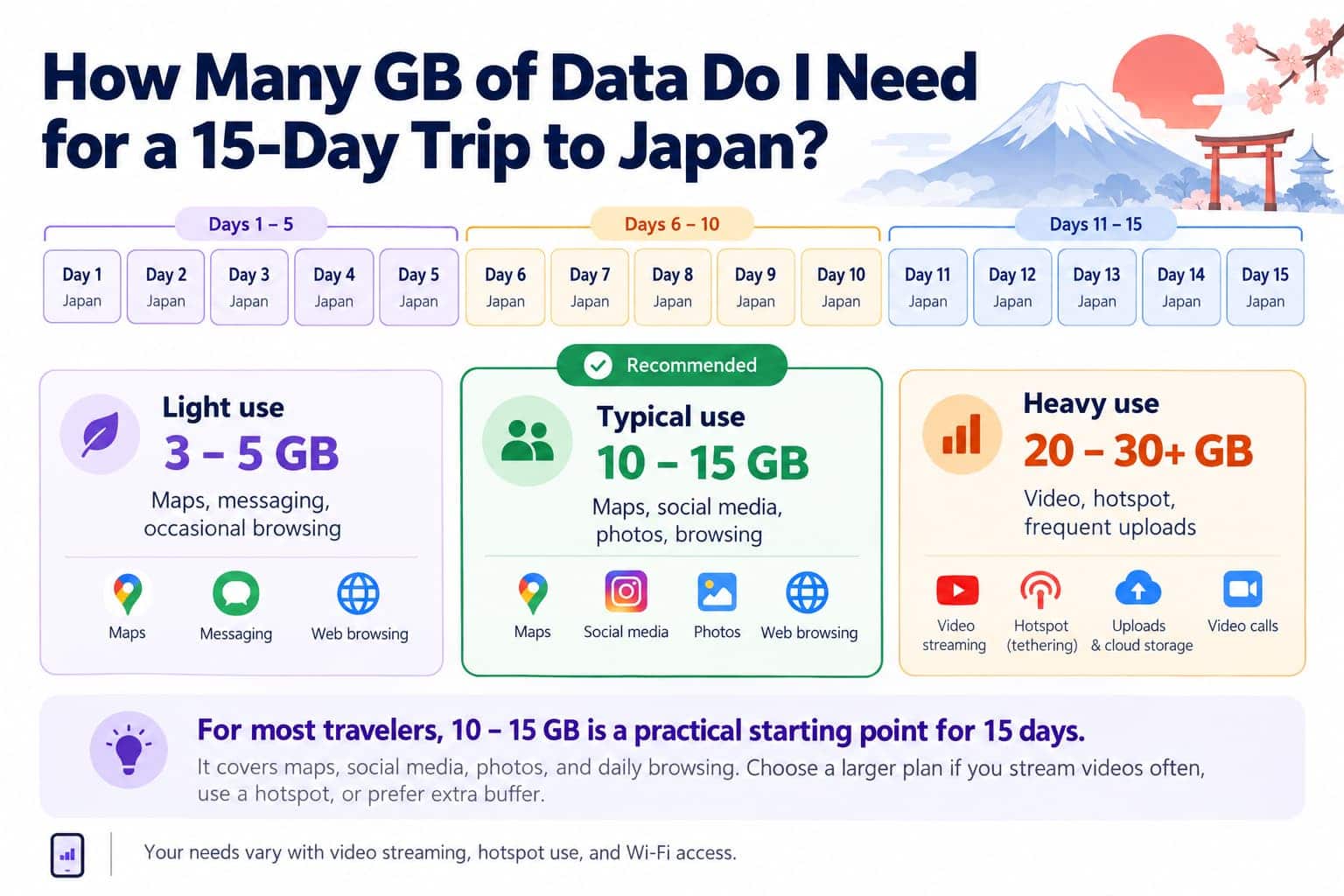
A typical traveler can expect to need about 15GB for 15 days in Japan, which works out to roughly 1GB a day. Light users who mostly check maps and send messages may use only 5–8GB, while heavy users who stream, share a hotspot or join video calls can pass 30GB. Video is what moves you between these groups.
Travel style
What your day looks like
Per day
15 days
Plan size to look for
Light
Maps and train routes, messaging, quick searches, a few photos sent to family
0.3–0.5GB
5–8GB
10GB
Typical
Everything above, plus social media with video, posting photos and stories, a few app calls
About 1GB
About 15GB
20GB
Heavy
Streaming on trains, lots of short videos, video calls, hotspot for a laptop or a travel partner
2GB or more
30GB or more
50GB, or 3GB per day
These figures are estimates rather than fixed rules. You’ll see different numbers in other guides, and your own total will depend most on how much video you watch and whether you can use hotel Wi-Fi in the evenings.
How is that estimate worked out?
For a 15-day trip to Japan, the estimate is about 1GB of mobile data per day, or 15GB in total, based on a typical sightseeing day that includes maps, messaging, short videos, photo uploads and web searches. Your actual usage will depend mainly on how much video you watch and whether you use mobile data for navigation throughout the day.
Estimated Data Usage on a Typical Day in Japan (Tokyo or Kyoto)
Activity
Estimated data usage per day
Google Maps and train route searches throughout the day
Up to 200MB
Messaging and around 30 minutes of voice calls through an app
Under 50MB
Around 45 minutes of social media, including short videos
Around 600MB
Uploading photos and Stories, web searches and translating menus with your camera
Around 100–200MB
Estimated daily total
Around 1GB
Estimated total for 15 days
Around 15GB
These figures are estimates, and video usually accounts for the largest share of daily data.
The voice-call estimate is based on Zoom’s guidance of 60–80kbps for audio. Counting both sending and receiving, that’s roughly 27–36MB per half hour.
The short-video figure uses Gigago’s TikTok estimate, in which 1GB lasts about 70 minutes with default settings. See our guide to how much data TikTok uses.
For the maps row, one self-described heavy user in a Japan travel group reported that Google Maps used about 4GB over 20 days, or around 200MB a day.
In practice, days vary. A Shinkansen ride with a show playing can use far more data than a day at temples with your phone in your pocket. That uneven pattern is the reason to buy one size above your estimate instead of an exact match.
How much data do travelers actually use in Japan?
Travelers sharing their experiences in Japan travel groups on Facebook reported using around 0.3–1GB per day, or 5–15GB over two weeks. Those who streamed videos, worked online or shared hotspots often used 1–2.5GB per day. These are individual reports, not survey results, but they give a useful reference.
Actual usage varies widely among travelers. One traveler used just 5GB in 16 days by relying on accommodation Wi-Fi, while a couple on a 15-day trip used 18–21GB each. Another traveler used 16GB in 14 days while working and sharing a hotspot with three devices.
Some travelers bought 20GB but used only 5–10GB, often because they connected to Wi-Fi at their accommodation. If you mainly use mobile data outdoors and upload photos or videos over Wi-Fi, a smaller plan may be enough.
How can you estimate your own usage before you fly?
Your own phone gives the most accurate estimate. Check how much mobile data you use in a normal week, divide it by seven to get your daily average, then multiply by 15. Then, add some extra data because you’ll likely use maps, search for information and upload photos more often while traveling.
iPhone: Go to Settings > Cellular (or Mobile Data). Scroll down and tap Reset Statistics to start tracking a fresh week.
Google Pixel: Go to Settings > Network & internet > SIMs > App data usage.
Samsung: Go to Settings > Connections > Data usage.
Keep in mind that your usage at home may be lower because you spend more time on Wi-Fi. In Japan, you’ll likely use mobile data more often while exploring.
What affects your mobile data usage in Japan?
Video streaming and hotspot sharing can quickly increase your data usage. Hotel Wi-Fi, offline downloads and limiting background uploads can help you save data.
Let’s take a quick look on the approximate data use of each activity of common travelers:
Activity
Approximate data use
Source
Netflix on mobile, Automatic setting
About 0.25GB per hour
Netflix Help Center
Netflix on mobile, Maximum Data setting
1GB per 20 minutes or more
Netflix Help Center
Zoom 1:1 video call in 720p HD
Up to about 1GB per hour
Calculated from Zoom’s 1.2Mbps-each-way guidance
TikTok with default settings
About 1GB per 70 minutes
Gigago estimate
Sharing Your Mobile Hotspot: Sharing your connection with a travel partner or laptop means using data for multiple devices. Laptops may also run updates and cloud backups in the background. Families can choose an eSIM for each person, a larger plan shared by hotspot, or pocket Wi-Fi in Japan. See how much data a hotspot uses to estimate the extra usage.
Automatic Photo and Video Backups: iCloud Photos and Google Photos can upload pictures over mobile data, adding to your usage throughout a sightseeing day. Pause automatic backups or set them to Wi-Fi only before you travel.
Google Maps and Offline Navigation: Google Maps uses relatively little data for individual lookups, but usage can add up when you navigate throughout the day. Downloading offline maps can help save data, although Google Maps does not provide offline transit, walking or cycling directions. You’ll still need an internet connection for those routes.
Using Free Wi-Fi in Japan: Hotel Wi-Fi and public hotspots can reduce your mobile data use, especially for streaming and uploading photos. Tokaido, Sanyo and Kyushu Shinkansen trains offer Shinkansen_Free_Wi-Fi, which requires you to log in again every 30 minutes, according to JR Central.
The Japan Wi-Fi auto-connect app can also connect to supported free hotspots at locations such as airports, trains, convenience stores and coffee shops. However, Wi-Fi won’t replace mobile data when you’re out exploring. For more options, see our guide to mobile internet in Japan.
How do you choose the right plan for 15 days in Japan?
Estimate how much data you’ll need, then choose a plan with some extra capacity in case your usage increases. A total data plan works well if your daily usage varies, while a daily plan offers a fixed allowance each day.
Also, check the plan’s validity carefully. Gigago counts usage days by Beijing time, which is one hour behind Japan. Consider adding a day of validity to avoid your eSIM expiring before your trip ends.
Guide to choose a data plan for a 15-day trip in Japan
Should you choose a daily plan or a total data plan?
A total data plan gives you one pool of data for the entire trip, while a daily plan resets your allowance each day.
Choose a total data plan if your usage varies. You can save data on quiet days and use more when exploring busy cities. However, heavy usage early in the trip may leave you short later.
Choose a daily plan if you prefer a set allowance each day. But if you use all your data before the daily reset, you may lose mobile data access until the next allowance becomes available. However, choose a daily allowance that covers your busiest days, not just your average usage
Gigago’s Japan eSIM offers multiple eSIM plans for travelers’ needs, starting at $2.0. For a 15-day trip, use these estimates as a starting point:
Light users: 10GB for browsing, maps and messaging.
Typical users: 20GB for regular navigation, social media and photo sharing.
Heavy users: 50GB or 3GB/day for frequent video streaming, video calls or hotspot sharing.
The plan supports hotspot sharing, so you can connect another device or share data with a travel partner.
Use Wi-Fi for data-heavy tasks, limit background uploads and check your usage every few days. These simple habits can help you avoid running out of data near the end of your trip.
Before You Travel
Download Japanese in Google Translate. Save the language pack over Wi-Fi so you can translate without an internet connection. Camera translation also works offline for supported languages.
Download entertainment in advance. Save shows for your train journeys before leaving. You can also set Netflix to use less mobile data or stream only over Wi-Fi.
Limit background data. Turn on Low Data Mode for your Japan eSIM on iPhone, or Data Saver on Android. Also, set photo backups to Wi-Fi only to avoid uploading large files while sightseeing.
Restrict automatic app updates to Wi-Fi. On Android, open Google Play and go to Profile > Settings > Network preferences > Auto-update apps > Over Wi-Fi only. See Google’s instructions.
During Your Trip
Connect to hotel or public Wi-Fi for streaming, backups and large downloads.
Check your mobile data usage every few days and adjust your habits if you’re using it faster than expected.
Save mobile data for essentials such as maps, translation, transport information and messaging.
For most travelers, 10–20GB is a reasonable starting point for a 15-day trip to Japan, depending on how often you use maps, social media and mobile data. Light users may need less, while frequent streamers and hotspot users should consider a larger plan.
eSIM validity is the period during which your data plan remains usable. Depending on the plan, the countdown starts when you install the eSIM by scanning its QR code or when it first connects to a supported network at your destination. Your plan expires when its validity period ends or if you use up the […]
Most travelers want mobile data the moment they land, without uploading a passport or queuing to register a SIM at the airport. The good news is that many data-only travel eSIMs can be purchased online without ID verification. However, some plans, especially those with a local phone number, may require identity verification before you can […]
A travel eSIM can stop working on your iPhone because the line was turned off, your data is running through another SIM, or the eSIM was deleted. If the eSIM still appears in Settings > Cellular, you can usually get back online by turning the line on, selecting it for cellular data and checking Data […]
Before traveling to mainland China, download and set up the apps you’ll need for payments, messaging, maps, transportation and translation. Many familiar services, including Google services, WhatsApp and Instagram, are blocked on standard mainland Chinese networks, so it’s important to prepare alternatives before you arrive. Start with Alipay or WeChat Pay for payments, WeChat for […]
A good navigation app needs to do more than find the fastest route when you’re traveling abroad. You may need offline directions, public transit information, reliable place details, or navigation in a country where some services are restricted. So, which is better for travel: Apple Maps or Google Maps? This guide compares Apple Maps and […]
One of the most common questions travelers have before using an eSIM is “Does time zone affect your travel eSIM’s validity period?” whether changing time zones will shorten their data plan. If you buy a 7-day eSIM, fly across multiple countries, or cross the International Date Line, it’s natural to wonder whether changing time zone […]