Many travelers worry when their eSIM only shows 4G or LTE, or wonder whether they should pay attention to plans labeled 5G. For maps, messaging, ride-hailing and most video calls, 4G/LTE is usually enough, and 5G mostly helps with heavy data use when your phone, plan and local network all support it.
This guide compares 5G vs 4G on a travel eSIM in practical terms. You’ll learn:
How the two networks differ in speed, coverage and battery use
What your phone and plan need before 5G can work abroad
Why your eSIM may show 4G and what to check
When a 5G plan is worth choosing for your trip
In this article
What is the difference between 5G and 4G on a travel eSIM?
5G is the newer and can deliver faster speeds than 4G/LTE, but 4G usually provides enough performance for everyday travel tasks. The connection you get depends on your phone, eSIM plan, local network and coverage.
Factor
4G/LTE
5G
Speed
Enough for most travel tasks
Can be faster with a strong signal, but not guaranteed
Coverage
Often available across cities and many rural areas
Often strongest in cities; availability varies by destination
Battery (iPhone)
May be a practical alternative when 5G is weak
Keeping 5G On may reduce battery life
When 5G isn’t available
Remains available if supported by your plan and network
Usually falls back to 4G/LTE
On a travel eSIM
Standard on the plans we checked
Depends on the plan and the destination
The table shows a simple takeaway: 5G is useful when you can benefit from the extra speed, but it is not essential for every trip.
Note: Not all 5G networks work the same way. NSA 5G uses an existing 4G core, while SA 5G has a dedicated 5G core. mmWave 5G offers very high speeds over short distances and is supported only in the US on iPhones purchased in the US. The 5G icon alone does not guarantee faster speeds. You can learn more about what LTE means.
Is 5G actually faster than 4G on a travel eSIM?
Yes, 5G can be faster when coverage is strong. The 5G icon indicates network availability or connection status, but it alone does not guarantee better performance or a guaranteed speed. Apple says the icon appears based on the carrier’s network configuration and, in rare cases, may show even when 5G coverage isn’t available. It doesn’t tell you how fast your connection will be.
On a travel eSIM, though, your real speed also depends on signal strength, how busy the cell tower is and the limits of your plan. Here are the details of each factor:
Signal strength: A weak 5G signal may perform worse than a strong 4G connection. Thick walls, basements and distance from a cell tower can reduce speeds.
Network congestion: When many people use the same cell tower, speeds can drop. Travel eSIM users may also experience slower data during busy periods, depending on the network and plan.
Your plan’s limits: Some eSIM plans reduce speeds after you use a daily high-speed allowance. Switching from 4G to 5G will not remove that restriction.
When does 5G vs 4G make a real difference for travelers?
5G is most useful for data-heavy activities, such as downloading large files, backing up photos and videos, working remotely or connecting a laptop through a hotspot.
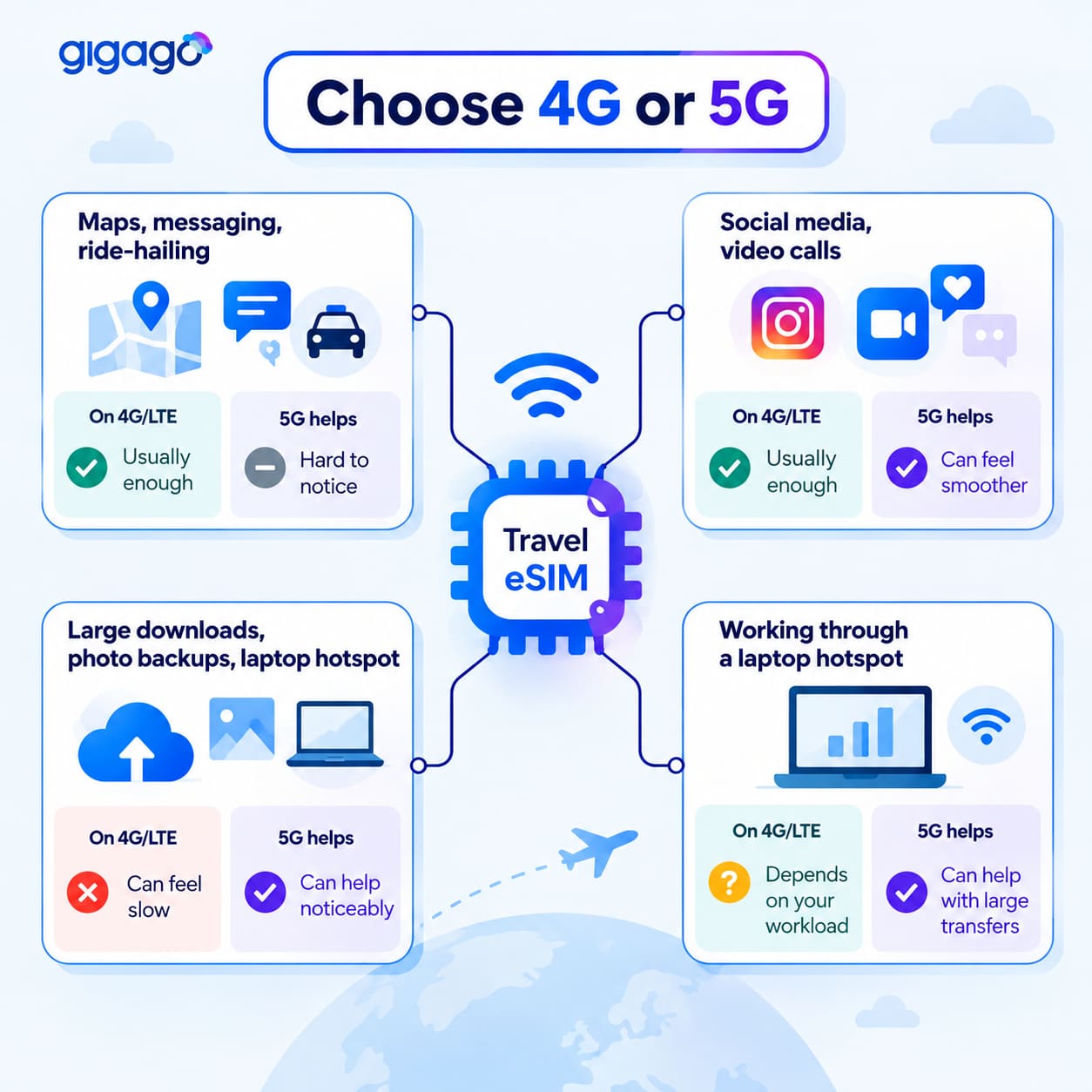
4G/LTE is usually sufficient for maps, messaging, social media, ride-hailing and everyday video calls.
Activities
On 4G/LTE
How much 5G helps
Maps, messaging, ride-hailing
Usually enough
Hard to notice
Social media, video calls
Usually enough
Can feel smoother with a strong 5G signal
Large downloads, photo backups, laptop hotspot
Can feel slow
Can help noticeably with a strong signal
Working through a laptop hotspot
Depends on your workload
Can help with large transfers and other data-heavy tasks
The biggest benefit of 5G is faster data transfer for demanding tasks, but speed is only part of the equation. Your data allowance and any high-speed limits can still determine how much you can do online, even on a 5G connection.
For example, Gigago’s Singapore Unlimited plan currently includes 1GB of high-speed data per day, then reduces speeds to 5 Mbps. The Malaysia Unlimited plan provides 1GB per day before reducing speeds to 10 Mbps. Once you reach these daily limits, switching between 4G and 5G won’t remove the speed restrictions.
How 5G and 4G make difference for activities while traveling
What do you need to get 5G on a travel eSIM?
You need a 5G-compatible phone, a travel eSIM plan that supports 5G in your destination, a compatible local network and coverage in your current location. If any of these conditions is missing, your phone may connect through 4G/LTE instead.
1. A 5G-compatible, unlocked phone
Your phone must support 5G to connect to a 5G network. On iPhone, 5G support starts with the iPhone 12 series. For Android, check the specifications of your exact model.
A 5G phone doesn’t guarantee 5G in every country, but without one you’ll stay on 4G.
Not every travel eSIM plan supports 5G, even in the same country. Check the network and speed information on the product page before purchasing.
For example, Gigago’s UK eSIM provides 20GB and 50GB 30-day plans as 4G/LTE, while the 100GB 30-day plan is listed as 5G.
For the Vietnam eSIM, the Viettel plans are the ones that explicitly mention 5G/4G, so check the details of the other plans if you are going to buy this.
Gigago’s Global eSIM currently offers 5G/4G in the United States and the United Kingdom, but 4G only in New Zealand and Pakistan. A multi-country plan may therefore provide 5G in one country and only 4G in another.
These are product-specific examples, so check the latest details for your chosen plan and every country on your itinerary.
3. Local 5G coverage and network access
Even if your phone and eSIM plan support 5G, you can only access it where the local network and your plan allow it. Travel eSIMs connect through partner networks, and 5G availability may depend on whether the plan supports 5G roaming on that network.
If 5G roaming isn’t supported, your eSIM may connect through 4G/LTE instead. Coverage also varies by location, with 5G often more widely available in cities than in rural areas.
How can you tell if you’re really getting 5G speeds?
To know your real speed, run a speed test on 5G and LTE in the same location to see whether 5G makes a noticeable difference. Follow these steps:
Turn off Wi-Fi so the test uses mobile data.
Make sure your travel eSIM is selected as your cellular data line.
Select 5G Auto or 5G On in your phone’s network settings, then run a speed test.
Switch Voice & Data to LTE and run the test again in the same place.
Compare download speeds and how smoothly maps and apps load.
For a fair comparison, test under similar conditions. If you’re indoors, try again outside or near a window to rule out weak signal strength.
Important: If you’ve already reached your plan’s daily high-speed data limit, both tests may show reduced speeds. This reflects your plan’s restrictions rather than the difference between 4G and 5G.
You should switch to LTE if your 5G connection is unstable, feels slow or drains your battery quickly. If your connection works well, leave your phone on 5G Auto. LTE can be more practical in areas with weak 5G coverage, inside buildings or during long journeys where your phone repeatedly switches between networks. It is also sufficient for everyday tasks such as maps, messaging and browsing.
Use 5G On when you need faster downloads and have a strong 5G signal. Since keeping 5G On may reduce battery life, consider switching back to 5G Auto afterwards.
A 5G plan is worth considering if you regularly download large files, work online or use a laptop hotspot in areas with reliable 5G coverage. If you mainly use maps, messaging and social media, a 4G/LTE plan with enough data is usually sufficient.
Use this comparison to decide what to prioritize for your trip.
Your travel needs
What to prioritize
City trip, remote work or laptop hotspot
A plan that supports 5G in your destination and provides enough high-speed data
Multi-country trip or rural travel
Reliable coverage and sufficient data; treat 5G as a bonus
Light use, such as maps and messaging
A 4G/LTE plan with enough data
Phone that does not support 5G
Data allowance, coverage and validity rather than 5G
Compare the whole plan, not just the network type. Check the high-speed data allowance, validity period and hotspot support before buying.
For example, Gigago’s Thailand Unlimited Lite plan is listed as providing a steady 10 Mbps, while Thailand Unlimited Max is listed as offering high-speed 5G/4G data without speed throttling on its 8-, 15- and 30-day plans. Check the current product terms before purchasing, as plan conditions can change.
When you’re ready, compare Gigago eSIM plans by destination to find the right balance of network access, data allowance and validity for your trip.
Frequently Asked Questions
Can you get 5G on a travel eSIM while your home SIM stays active?
Yes. If your phone supports 5G and your travel eSIM plan and local network support it, you can use 5G while keeping your home SIM active. On iPhone, only one line is used for cellular data at a time. Select your travel eSIM as the cellular data line to use its data connection. Your home SIM can remain active for other supported services.
Will your phone switch back to 5G automatically?
In most cases, yes. On iPhone, 5G On uses 5G whenever it is available, while 5G Auto may choose LTE when 5G would not provide a noticeable benefit. Your phone can only reconnect to 5G when your device, travel eSIM plan and local network support it and 5G coverage is available.
Is 4G enough for a travel eSIM?
Yes. 4G/LTE is usually sufficient for maps, messaging, ride-hailing, browsing, social media and most video calls. 5G is more useful for data-heavy tasks such as large downloads, photo backups and laptop hotspot use.
Does a 5G eSIM use more battery than a 4G eSIM?
It can, particularly when your phone is set to keep 5G On or when the signal is weak and the phone repeatedly switches networks. On supported iPhones, 5G Auto can help balance performance and battery life.
Does 5G give you more mobile data?
No. 5G can improve connection speed, but it does not increase your plan’s data allowance. If your eSIM has a daily high-speed data limit, that limit still applies whether you use 4G or 5G.
When you buy a travel eSIM, you usually choose between a plan with a set number of gigabytes and an “unlimited” plan that costs more. If you mostly use maps, messaging and browsing, a fixed plan with some spare data is often the cheaper choice. Unlimited is worth it when you stream, share a hotspot […]
When a flight is delayed or cancelled, a reliable internet connection helps you check airline updates, find rebooking options and notify your hotel or airport transfer about changes to your arrival time. Airport Wi-Fi may be slow or unavailable when you need it, so having mobile data ready before your trip gives you another way […]
eSIM validity is the period during which your data plan remains usable. Depending on the plan, the countdown starts when you install the eSIM by scanning its QR code or when it first connects to a supported network at your destination. Your plan expires when its validity period ends or if you use up the […]
Most travelers want mobile data the moment they land, without uploading a passport or queuing to register a SIM at the airport. The good news is that many data-only travel eSIMs can be purchased online without ID verification. However, some plans, especially those with a local phone number, may require identity verification before you can […]
A travel eSIM can stop working on your iPhone because the line was turned off, your data is running through another SIM, or the eSIM was deleted. If the eSIM still appears in Settings > Cellular, you can usually get back online by turning the line on, selecting it for cellular data and checking Data […]
Buying too little data for 15 days in Japan means running out mid-trip, while buying too much wastes money. A typical traveler who uses maps, messaging and social media daily can expect to use around 1GB a day, so a 20GB plan covers roughly 15GB of use with a buffer. Light users can usually manage […]