A pocket WiFi lets you carry a personal internet hotspot wherever you go in Thailand. It allows you to connect your phone, laptop, and tablet to a single device without swapping SIM cards or worrying about carrier locks.
With rental prices starting at around $3–$5 per day and pickup available at all major Thai airports, it sounds like an easy choice. This pocket WiFi Thailand guide breaks down the real costs, the best rental providers, and how it compares to a modern Thailand eSIM so you can pick the best setup for your trip.
👉 Get your Thailand eSIM, activate it before you fly:
Thailand eSIM
$3.50
In this article
I. How Much Does Pocket WiFi Cost in Thailand?
While daily rental rates usually sit between $3 and $6 per day, the actual cost includes a few extra pieces. For a typical 7-day vacation, expect to spend around $22–$43 for the data plan itself, plus a mandatory security deposit.
Below is the cost breakdown for a 7-day rental:
Cost Item
Price Range (USD)
Notes
Daily Rental (4G device)
$3 – $5 / day
Good for maps, social media, and basic streaming.
Daily Rental (5G device)
$6+ / day
Best if you need heavy laptop usage or video calls.
7-Day Total Data Cost
$22 – $43
The core base price for a one-week trip.
Refundable Deposit
1,000 – 2,000 THB (~$28–$55)
Charged at pickup; returned when you hand back the box.
Shipping / Pickup Fee
$0 – $5
Free if you pick up at major airport counters.
Lost/Damaged Penalty
$50 – $150+
The fine if you lose the device, charger, or pouch.
What affects the price: Device type (4G vs 5G), rental duration (longer = slight discount), and pickup method (airport pickup costs a few dollars more per day than online pre-order).
⚠️ Note about “Unlimited”: most providers advertise “unlimited data”, but some apply slow speeds after heavy use. Therefore, you should always confirm whether your plan offers full-speed access throughout the rental period.
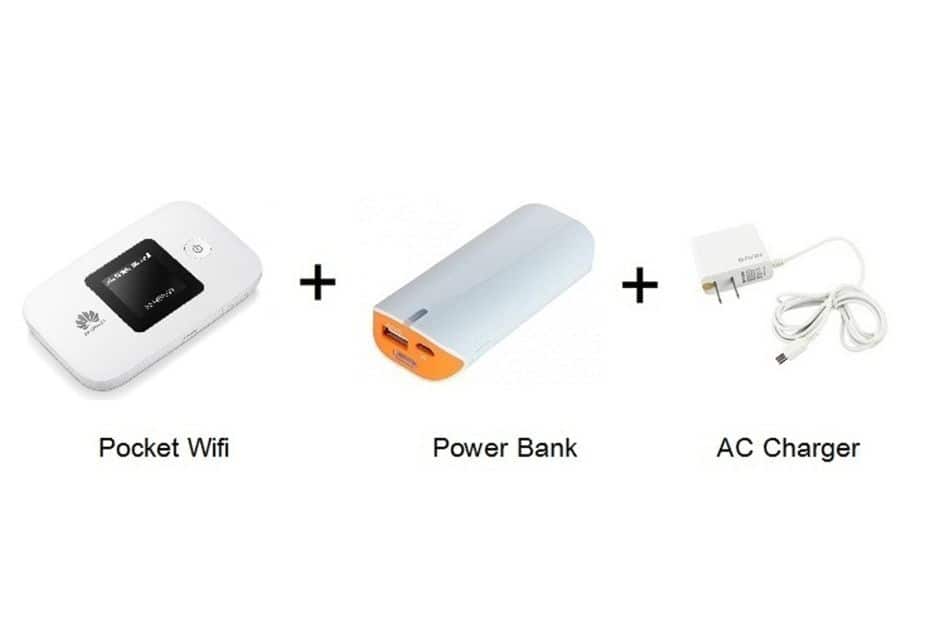
A kit of pocket WiFi
II. 5 Best Pocket WiFi Providers in Thailand
These are the most reliable pocket WiFi rental brands recommended by the Thailand travel community for their reliable coverage and straightforward pickup options:
ThaiSims offers the lowest rates in the market—sometimes as low as $1/day—but only if you plan ahead and book your slot at least two months in advance via their website.
Devices supported: Up to 8 connected devices with unlimited 4G LTE on a nationwide network
Delivery method: Hotel delivery or airport pickup at BKK.
Pro Tip: Their device batteries drain relatively fast under heavy use, so consider renting their add-on power bank for an extra $1/day.
2. SmileWiFi — Most Convenient Airport Pickup
SmileWiFi is the most convenient option if you want a device in hand the moment you land and get online without waiting.
Device offer: both standard 4G LTE and premium high-speed 5G pocket routers.
Pickup locations: 24/7 physical service counters at Suvarnabhumi (BKK), Don Mueang (DMK), and Phuket (HKT) airports.
Cost: Around $4.60–6/day depending on device type (5G units cost more).
Booking on their website early secures a cheaper “special rate” compared to buying directly at the airport counter.
3. MUAYTHAI WiFi — widest city pickup network
MUAYTHAI WiFi stands out for having the most pickup locations beyond just airports.
Devices supported: Reliable 4G LTE unlimited data that easily pairs with 5–8 devices (though keeping it to 2–3 devices yields the best speeds).
Pickup locations: BKK airport, DMK airport, CentralWorld shopping plaza, Terminal 21 Asoke, and their Bangkok Samurai office.
Cost: ~$4.60/day.
4. Klook WiFi — easy booking platform
If you already use Klook for tour bookings and airport transfers, renting your WiFi through their app is incredibly simple.
Devices supported: Standard unlimited 4G pocket routers with roughly 8 hours of continuous battery life.
Pickup locations: Voucher-based redemption at major airport arrival halls (BKK, DMK, HKT).
Daily rate: ~$4.65/day.
You can read verified reviews from thousands of past travelers and enjoy flexible cancellation policies if your flight plans change.
5. Phuket Pocket WiFi — cheapest for Phuket travelers
If you are flying directly into Phuket, this is the lowest daily rate available.
The logistics are simple, but you need to plan your arrival window.
Travelers can either pick up the device at the airport right after landing, or pre-order online and have it delivered to their hotel before they arrive. Both work well. The choice depends on whether you want instant access or a better rate.
1. Airport pickup
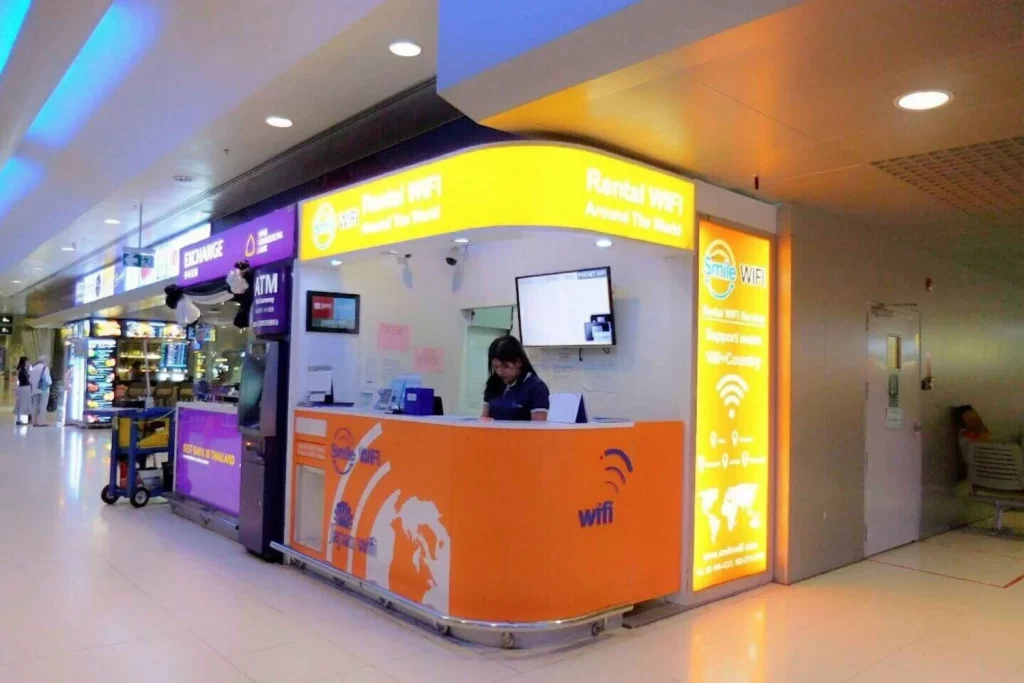
After clearing immigration and grabbing your bags, walk to your provider’s designated airport booth (SmileWiFi and Klook are easily spotted in the arrivals hall). Show your booking confirmation (or book on the spot at SmileWiFi), pay, and collect the device.
Pros: Instant — you are online the moment you leave the terminal.
Cons: A few dollars more per day than online rates. Airport counters may have queues during peak hours.
2. Online pre-order + hotel delivery
You book the device online at least 3 days (72 hours) before arrival and provide your hotel or Airbnb address. You will need to send a copy of your passport by email. The device ships to your hotel or Airbnb and is waiting when you check in.
Pros: Cheaper rental rates, guaranteed availability during peak season, no airport queues.
Cons: You are offline between landing and reaching your hotel. Use the free airport WiFi (1–2 hours at BKK, DMK, Phuket) to bridge the gap.
Returning the device
Do not forget to return the device before your flight home, or you will forfeit your deposit.
Most providers include a prepaid return envelope in the rental package. You can simply seal the device inside and drop it into any official Thailand Post mailbox located right inside the airport departure terminals.
Alternatively, some providers also accept in-person drop-off at their airport counter.
Note: Always confirm the return process before you rent. Late returns or unreturned devices incur a penalty fee of $50–150+.
Smile WiFi Booth for renting a pocket WiFi in Bangkok airport
IV. Practical Tips for Pocket WiFi in Thailand
Pocket WiFi works great, but it comes with a few daily responsibilities.
Bring a power bank. Battery life is the main downside of pocket WiFi. Most devices last 6–8 hours of active use — not enough for a full day of sightseeing. You can rent one from ThaiSims for $1/day. Turn the device off when not in use to stretch the battery through the evening.
Don’t wander too far. Your phone needs to stay within 10–20 meters of the pocket router. If you leave it in the hotel room, your phone loses connection the moment you step outside.
Connect up to 5–8 devices simultaneously, depending on the model. This is the core advantage of pocket WiFi — everyone in your group connects to one device without draining anyone’s phone battery.
Understand that coverage depends on the underlying network. Most providers use AIS or True Move H infrastructure. Coverage is strong in cities and tourist areas. In very remote islands or mountain areas, signal may drop regardless of device. This is a network limitation, not a pocket WiFi issue.
V. Pocket WiFi vs. Thailand eSIM: Which Is Right for You?
If carrying around a second device, charging it every night, and worrying about return deadlines sounds tedious, a Thailand eSIMis the modern alternative. It does almost everything a pocket WiFi can do—at a fraction of the price, without an extra device.
Criteria
Pocket WiFi
Thailand eSIM (Gigago)
Average Cost (7 days)
$22–43 + deposit
$8.90
Data Performance
Unlimited 4G (most plans)
35 GB or truly unlimited (no throttling)
Devices
5–8 simultaneously
1 phone + hotspot to share
Requires
Nothing — works with any device
eSIM-compatible, unlocked phone
Thai phone number
❌ No
✅ Yes
Battery
Separate device, 6–8 hrs
Uses your phone battery
Setup
Airport pickup or hotel delivery
Scan QR code before landing
Return
Must return or face penalty
Nothing to return
When to Choose Pocket WiFi:
You are traveling in a group of 3 or more people who plan to stay together the entire trip and want to split one bill.
Your phone is carrier-locked or an older model that does not support eSIM hardware.
You need to keep a laptop online for remote work all day long without frying your phone’s battery via hotspot tethering.
When to Choose an eSIM:
You are a solo traveler or a couple. One person can buy a Gigago Thailand eSIM starting at $8.90, turn on their phone’s personal hotspot, and share data with their partner easily.
You want a Thai phone number, so you can register for local ride-hailing apps (like Grab or Bolt) and let drivers call you when they are looking for your pickup spot.
You do not want to deal with deposits, returns, or another device to charge.
You want truly unlimited high-speed data — Gigago’s unlimited Thailand eSIM plans have no throttling, unlike some pocket WiFi “unlimited” plans that slow down after heavy use
VI. Gigago Thailand eSIM Plans – Alternative to Pocket WiFi
Gigago is an authorized partner of DTAC / True Move H (one of Thailand’s top networks), so Thailand eSIM plans give you premium 5G/4G coverage, high-speed data without renting a device.
Below are best Thailand eSIM plans from Gigago to consider:
Duration
Data
Other Features
Price
7 days
35 GB (upgraded from 15GB – limited time offered)
– Real Thai phone number – For incoming calls only
$8.90
8 days
Unlimited (truly unlimited, no throttling)
– Real Thai phone number – Free incoming calls + SMS – 100 Baht international call credit – Free call to all networks in Thailand
$15.90
10 days
Unlimited
– Real Thai phone number – For incoming calls only
$15.90
15 days
Unlimited
Same as the 8-day plan
$24.90
30 days
Unlimited
Same as the 8-day plan
$44.90
👉Browse and buy the best Thailand eSIM plan for your trip here:
DTAC/True
Unlimited - 8D
Only
$ 15.90
฿100 intl. call
DTAC/True
Unlimited - 10D
Only
$ 15.90
Free answering
DTAC/True
Unlimited - 15D
Only
$ 24.90
Free answering
DTAC/True
Unlimited - 30D
Only
$ 44.90
100 THB call credit
DTAC/True
35GB - 7D
Only
$ 8.90
Free answering
VII. FAQs
Where exactly are the SmileWiFi counters at the airports?
At Suvarnabhumi (BKK), you can find them on Floor B (the Airport Rail Link level). At Don Mueang (DMK), they are on Floor G near Domestic Arrivals Gate 12. At Phuket Airport (HKT), their counter is on the 1st Floor of the International Arrivals Hall near Gate 1. All locations are open 24/7.
Can I share my pocket WiFi data with a laptop?
Yes. Pocket WiFi devices operate exactly like your home internet router. Any WiFi-enabled device—laptops, iPads, MacBooks, and Kindle e-readers—can sign into the network using the password printed on the back of the device.
What happens if I return the pocket WiFi late?
If you miss your return deadline, the provider will charge a daily late fee equivalent to the standard non-discounted rental rate for every extra day. This amount is automatically deducted from your security deposit before the remainder is refunded to your card.
Does a pocket WiFi include a local phone number?
No. Pocket WiFi devices only provide wireless internet data. They cannot make traditional cellular phone calls or receive SMS text messages. If you need a local Thai number to coordinate with tour guides or call restaurants, a Gigago eSIM is the better option.
Most Indian travelers heading to Thailand either recharge a Jio/Airtel roaming pack or plan to grab a physical SIM at the Bangkok airport. Both work, but neither is the cheapest way to stay connected anymore. A Thailand eSIM costs a fraction of what Jio or Airtel charge for international roaming, gives you significantly more data, […]
India is now one of the top sources markets for Thailand tourism. Yet most still overpay for connectivity: a Jio international roaming packs gives you just 5GB for ₹2,999, while Airtel charges ₹1,198 for a mere 3 GB. A Thailand eSIM flips that equation. Whether you need a budget-friendly option starting under ₹850 or unthrottled, […]
AIS is Thailand’s largest mobile network by revenue. This mobile network carrier offers strong coverage from Bangkok’s BTS stations to Koh Tao’s dive sites, fast 5G in major cities, and tourist SIM plans available at every airport. Whether it’s worth buying over a DTAC/True Move H alternative depends on where you’re going and what you […]
Connecting to Phuket Airport WiFi (HKT) is easy, but only free within 02 hours. You also need to register your name and email to login. Phuket International Airport (HKT) is the second busiest airport in Thailand which welcomes millions of passengers annually. Arriving at Phuket Airport, you will need an Internet connection to navigate the […]
Navigating Bangkok Suvarnabhumi Airport (BKK) is always easier when you get connected. This guide will show you how to quickly get free Bangkok Airport WiFi upon arrival, and suggest alternative options to keep you connected throughout your trip in Thailand. I. Does BKK airport have free WiFi? Yes. Free WiFi is available at Suvarnabhumi Airport […]
All you need to know about DTAC SIM cards and eSIM for Tourists to Thailand that help you make an informed decision on choosing ways to connected with people back home while traveling.