Japan travel appscan make trains, payments and menus far easier, but only if they work on the phone and card you bring from home. For most visitors, start with Google Maps for routes, Google Translate for signs and menus, and a Suica payment option for trains and buses. iPhone users can add Suica to Apple Wallet, while most Android phones bought outside Japan require a physical IC card.
Shinkansen and taxi apps are worth adding only if your plans include them. Some also have specific requirements: smartEX is available in selected countries’ app stores, while the taxi app GO asks visitors to sign up after arriving in Japan.
This guide covers the essential and optional Japan travel apps, what works on foreign phones and payment cards, and what to set up before you fly. Since many of these apps need an Internet connection, arranging mobile data before arrival is also worth adding to your travel checklist.
In this article
Essential Japan Travel Apps at a Glance
For a typical first-time trip to Japan, these are the apps and services worth preparing. You do not need to install everything on the list; choose additional apps based on your itinerary.
Need
App or service
Priority
Works with a phone or card from abroad?
When to set it up
Train routes
Google Maps
Essential
Yes
At home; download offline maps as a backup
Trains and buses
Suica in Apple Wallet or Welcome Suica Mobile (iPhone); physical IC card (most foreign Android phones)
Essential
iPhone 8 or later; most Android phones sold abroad cannot add a mobile IC card
At home (iPhone) or after arrival (physical card)
Translation
Google Translate
Essential
Yes
At home; download Japanese
Safety alerts
Safety tips
Recommended
Yes
At home
JR Pass routes
Japan Travel by NAVITIME or Japan Transit Planner
If you have a JR Pass
Yes
At home
Shinkansen bookings
smartEX; JR-EAST Train Reservation
If you will book bullet trains
Depends on app availability and card authentication
At home
Taxis
GO or Uber
If you will take taxis
GO accepts international credit cards and Apple Pay; registration requires SMS
Download at home; sign up for GO after arrival
Menus and product labels
Kuli Kuli; Payke (iPhone)
Optional
Yes
Any time
Messaging
LINE
Optional
Yes
Before departure if needed
Arrival procedures
Visit Japan Web (website, not an app)
Recommended
Any browser
Before departure
If you are sticking to cities and local trains, Google Maps, Google Translate, a suitable IC card and mobile data will cover most of your needs. Add the other apps only when your itinerary calls for them.
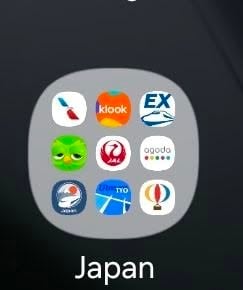
Favorite Japan travel apps shared by a traveler on a Facebook group about Japan travel
Best Apps for Getting Around Japan
Google Maps is the most useful starting point for navigating Japan. It provides train routes, fares, timetables, walking directions and connections between cities, making it practical for everyday journeys and longer trips.
If you have a Japan Rail Pass (JR Pass), consider adding one dedicated transit app:
Japan Travel by NAVITIME: Searches routes covered by more than 50 rail passes, including the JR Pass, and shows which sections are covered and where you may need to pay extra.
Japan Transit Planner by Jorudan: Also supports route searches with a JR Pass in mind and offers additional timetable and platform information through its paid plan.
You only need one of these apps. Choose the interface you find easier to use.
Note that Google Maps may suggest private railway or subway routes that are not covered by your JR Pass. Check the railway operator before boarding to avoid unexpected fares.
Navitime app – one of best japan travel navigation apps for tourists
How to Pay for Trains and Buses in Japan
An IC card is one of the easiest ways to pay for trains and buses in Japan. Suica, PASMO and ICOCA are widely accepted on compatible public transport and can also be used at many convenience stores and shops.
The best option depends on your phone:
iPhone users: Add Suica, PASMO or ICOCA directly to Apple Wallet and top it up through the Wallet app. Apple supports these cards on iPhone 8 or later and Apple Watch Series 3 or later. Welcome Suica Mobile is another option for overseas visitors using compatible iPhones, particularly those traveling in the JR East area.
Android users: Most Android phones purchased outside Japan cannot use mobile Suica because they lack Osaifu-Keitai, Japan’s mobile payment technology. Buy a physical IC card after arrival instead. JR East’s Welcome Suica visitor card has no deposit and is valid for 28 days.
Can you tap a credit card at train gates? Some Tokyo subway and private railway services, as well as Osaka Metro, accept contactless bank cards. However, JR East does not currently support contactless credit card entry across its gates. Keep an IC card if you plan to use JR lines around Tokyo.
Cash and an international credit card are useful backups, as some smaller shops and restaurants do not accept card payments.
Apps for Booking Shinkansen Tickets
The right booking app depends on which Shinkansen line you plan to use. Japan has several regional railway operators, and their reservation systems do not cover every route.
App or service
Best for
smartEX
Tokaido, Sanyo and Kyushu Shinkansen, including Tokyo, Kyoto, Osaka, Hiroshima and Fukuoka
JR-EAST Train Reservation
JR East Shinkansen routes and other eligible JR East services
JR-WEST ONLINE TRAIN RESERVATION
Shinkansen and limited express trains in western Japan
smartEX is free to use, has English pages and does not charge an annual membership fee. However, its app is listed only in selected countries’ App Store and Google Play stores, including the US, Canada, Australia, Singapore, Hong Kong, Malaysia and Thailand.
This restriction concerns app-store availability, not your nationality. If smartEX is unavailable in your country’s app store, you can register and book through its website using a browser instead.
smartEX accepts major international credit cards, including Visa, Mastercard, JCB, American Express, Diners Club and Discover. Your card must support 3-D Secure, an additional verification process used by banks. Some card issuers may also restrict overseas payments.
Once registered, you can link a compatible transport IC card to your booking and enter the Shinkansen gate by tapping it instead of collecting a paper ticket.
For routes north of Tokyo and other JR East services, use JR-EAST Train Reservation. In western Japan, JR-WEST ONLINE TRAIN RESERVATION offers English-language booking for eligible Shinkansen and limited express trains.
Check which railway line operates your route before choosing a booking service. For example, smartEX does not cover Tokyo-to-Sendai or Tokyo-to-Kanazawa journeys.
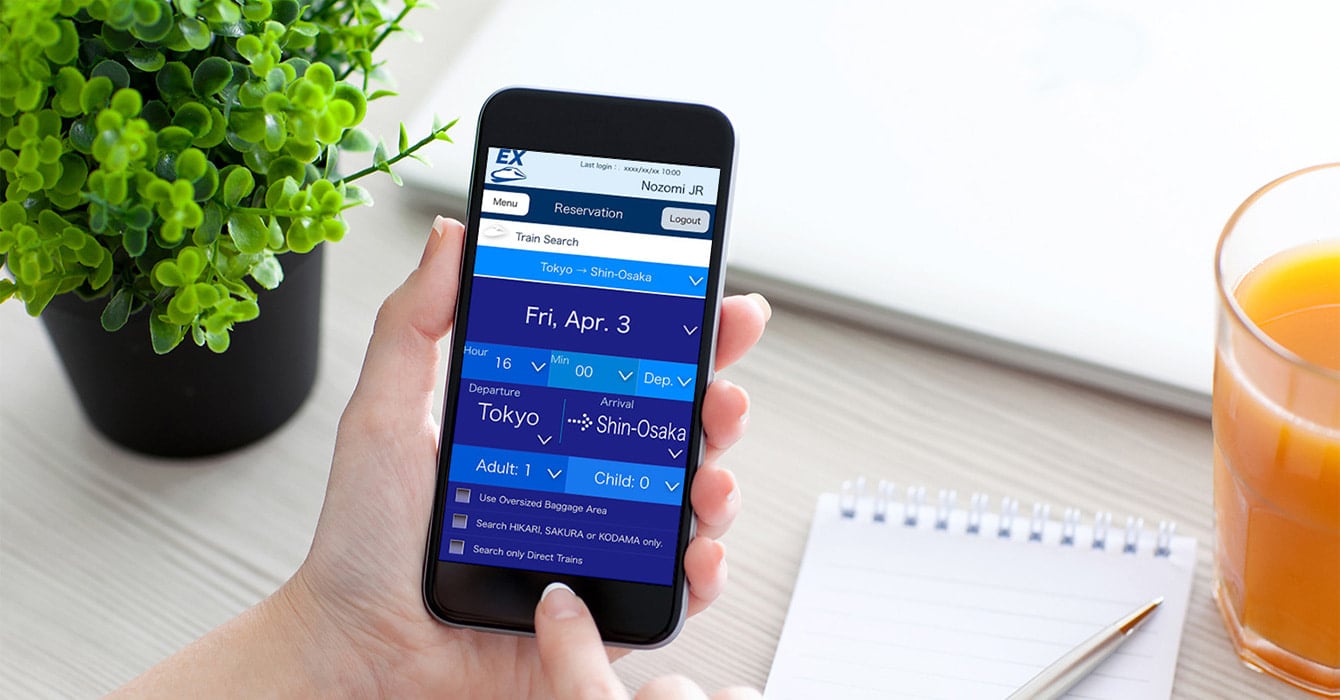
SmartEX is a favorite app by travelers for booking Shinkansen tickets
Best Translation and Communication Apps
Google Translate is the most useful translation app for most visitors. Its camera feature can translate Japanese signs, menus and product labels, while text translation helps with everyday communication.
Download the Japanese language pack at home over Wi-Fi. Text translation works offline once the language is downloaded, although some advanced features still require Internet access. Papago is another free alternative.
If you have food allergies or need help shopping, consider:
Kuli Kuli: Translates printed and handwritten menus and helps identify potential allergens.
Payke (iPhone): Scans product barcodes and displays product information in other languages.
LINE is one of Japan’s main messaging apps, with around 100 million monthly active users as of March 2026. Install it if your hotel, tour guide or local contacts prefer communicating through LINE. Otherwise, email or WhatsApp may be enough for a short trip.
Kuli Kuli – a good translation app in Japan
Best Taxi Apps in Japan
GO and Uber are useful options for booking taxis in Japan, especially if you do not speak Japanese.
GO covers all 47 prefectures and accepts international credit cards and Apple Pay, although availability varies by area. Download the app before departure, but register after arriving in Japan. GO requires SMS verification during sign-up.
Because a data-only travel eSIM cannot receive SMS, use your home phone number if it can receive verification texts while roaming. Check with your carrier before departure.
Uber also operates in Japan, mainly connecting passengers with licensed taxis. Other options include S.RIDE in selected cities and DiDi.
You do not need all these apps. GO or Uber is usually enough for most visitors.
GO is a common taxi app in Japan
Safety Apps for Travelers in Japan
Japan is prone to earthquakes, tsunamis, typhoons and other natural hazards. Installing a safety app before your trip can help you receive emergency alerts.
Safety tips is a free app supervised by the Japan Tourism Agency. It provides multilingual alerts for earthquakes, tsunamis, volcanic activity, severe weather and heatstroke. You can also add up to five locations along your itinerary and find nearby medical facilities and evacuation shelters.
For more detailed information, consider:
NERV Disaster Prevention: Provides rain radar, typhoon information, flood and landslide warnings, and river-level data.
NHK WORLD-JAPAN: Offers English-language news and emergency alerts for earthquakes, tsunamis and severe weather.
Safety tips is sufficient for most tourists. The other apps are optional.
Other Useful Apps for Specific Travel Plans
Some Japan travel apps are useful only for specific activities:
Tabelog: Helps you find restaurants, read reviews and book tables at participating restaurants. Some reservations require a credit card.
ecbo cloak and Bounce: Let you find and book luggage storage at participating shops and other locations. Check prices and baggage conditions before booking.
Tokyo Disney Resort: Useful if you visit Tokyo Disneyland or DisneySea. The app provides park information, attraction wait times and access to Disney Premier Access, the paid option for shorter waits at selected attractions.
You can skip these apps if they are not part of your itinerary.
Do You Need Mobile Data to Use Travel Apps in Japan?
Yes. Most Japan travel apps need an active Internet connection to provide their full features. Google Maps, taxi-booking services, online reservations and real-time travel updates are particularly dependent on mobile data.
Some apps offer offline features, but these are best treated as backups:
Google Maps: Downloaded maps help you view locations and your position, but offline mode does not provide train, walking or cycling directions.
Google Translate: Downloaded Japanese supports offline text translation, although some advanced features require Internet access.
GO and Uber: Require a live connection to book taxis and track drivers.
Booking apps: Need Internet access for reservations and account management.
Safety apps: Need connectivity to receive live emergency alerts.
What is the best way to get Internet in Japan?
International visitors generally have four options:
Option
Best for
Main consideration
Travel eSIM
Travelers with compatible, unlocked phones
Install before departure and use mobile data after arrival
Physical SIM card
Phones without eSIM support
Requires inserting a new SIM
Pocket WiFi
Groups sharing one connection
Requires carrying and charging an additional device
International roaming
Short trips or travelers who prefer their existing number
Check your carrier’s data rates and allowance
If your phone supports eSIM and is carrier-unlocked, a travel eSIM is a practical way to stay connected without changing your physical SIM card.
Gigago’s Japan eSIM uses Japanese mobile networks, including docomo, KDDI and Rakuten Mobile. Check the available data plans and choose one based on your trip length and expected usage.
The plan’s validity starts when the eSIM first connects to a supported network in Japan, according to the current product activation policy. You can therefore install it at home over Wi-Fi before departure without starting the validity period prematurely.
Gigago’s Japan eSIM is data-only and does not include a phone number. Keep your home SIM active if you need SMS verification codes, but turn off data roaming on that line to avoid unexpected charges.
Before purchasing, check that your phone supports eSIM and is carrier-unlocked. If it is incompatible, consider a physical SIM card, pocket WiFi or your home carrier’s roaming plan.
Japan Wi-Fi Auto-Connect, a free app from NTT-BP, can also help you access participating public Wi-Fi hotspots. However, use public Wi-Fi as a backup rather than your main connection.
Should You Complete Visit Japan Web Before Departure?
Visit Japan Web is the Japanese government’s free online service for completing immigration and customs procedures before arrival. It lets you enter your travel details in advance and generate a QR code for supported procedures at the airport.
It is a website, not an app, so you do not need to download anything. Complete the required information a few days before departure, save a screenshot of your QR code and use only the official government website to avoid lookalike sites that charge unnecessary fees.
Japan Travel App Checklist: Before You Fly and After You Land
Set up your essential apps and payment options at home over reliable Wi-Fi.
Before you fly
Check that your phone supports eSIM and is carrier-unlocked.
Install your Japan eSIM if you plan to use one.
Add Suica to Apple Wallet or prepare to buy a physical IC card after arrival.
Download offline maps in Google Maps and Japanese in Google Translate.
Install Safety tips and add your destination cities.
Register with smartEX if you plan to take the Tokaido, Sanyo or Kyushu Shinkansen.
Install GO, but wait until arrival to register.
Complete Visit Japan Web and save your QR code.
Check that your home phone line can receive SMS while roaming if needed.
After you land
Switch on your Japan eSIM for mobile data.
Keep your home line active for SMS, with data roaming disabled.
Complete GO registration if you plan to use it.
Buy a physical IC card if your phone does not support mobile Suica.
Top up your IC card as needed.
Final Thoughts: Which Japan Travel Apps Do You Really Need?
Most visitors do not need dozens of apps to travel around Japan. Google Maps, Google Translate, a suitable Suica or IC card option, and Safety tips cover the main needs of a typical trip.
Add smartEX or JR-EAST Train Reservation if you plan to take the Shinkansen, GO or Uber if you need taxis, and specialized apps such as Tabelog or the Tokyo Disney Resort app only when your itinerary calls for them.
Just as important, make sure you have reliable mobile data before leaving the airport. Many of these apps depend on an Internet connection for navigation, bookings, translation and real-time updates. A compatible travel eSIM can help you stay connected throughout your trip without relying entirely on public Wi-Fi.
BTS brings the ARIRANG World Tour to Kaohsiung, Taiwan, on November 19, 21 and 22, 2026, at Kaohsiung National Stadium, also known as the World Games Stadium. To enter, you need your concert ticket and original photo ID matching the ticket holder’s name. International attendees should bring their original passport. The stadium is an 800-meter […]
If you need your laptop online abroad, you don’t have to depend on hotel or café Wi-Fi. Install a travel eSIM on your phone, choose a plan that allows hotspot or tethering, and share the connection with your laptop over Wi-Fi, USB or Bluetooth. Two things decide how well this works: hotspot support depends on […]
Travel eSIM plans typically offer limited validity periods, often around 30 days, and many providers require QR codes to be installed within a set period after purchase. So, can you use an eSIM for more than 30 days and stay connected on a 60- or 90-day trip without wasting data or losing connectivity? This guide […]
Using mobile data wisely while travelling starts with understanding where your data goes. Apps can consume data even when you are not actively using them, through automatically playing videos, background photo backups, and app updates. This guide explains how to monitor and reduce your data usage while traveling, identify data-hungry apps, and adjust your settings […]
Many travelers worry when their eSIM only shows 4G or LTE, or wonder whether they should pay attention to plans labeled 5G. For maps, messaging, ride-hailing and most video calls, 4G/LTE is usually enough, and 5G mostly helps with heavy data use when your phone, plan and local network all support it. This guide compares […]
When you buy a travel eSIM, you usually choose between a plan with a set number of gigabytes and an “unlimited” plan that costs more. If you mostly use maps, messaging and browsing, a fixed plan with some spare data is often the cheaper choice. Unlimited is worth it when you stream, share a hotspot […]